Knowledge Base
Create and manage articles to help agents and end users resolve common issues faster.
Created April 1, 2026
Overview
The Knowledge Base is a place to store helpful articles that agents and end users can refer to when working through common questions or issues. Instead of answering the same question repeatedly, you can write it up once and point people to it.
Articles are organized into categories, so your team can quickly find what they need without digging through a long list. You can keep articles as drafts while you're writing them, publish them when they're ready, or archive them if they're no longer relevant.
Create Category 
Categories are folders that help keep your articles organized and easy to find. You can place categories inside other categories to group things however makes sense for your team.
Create Article 
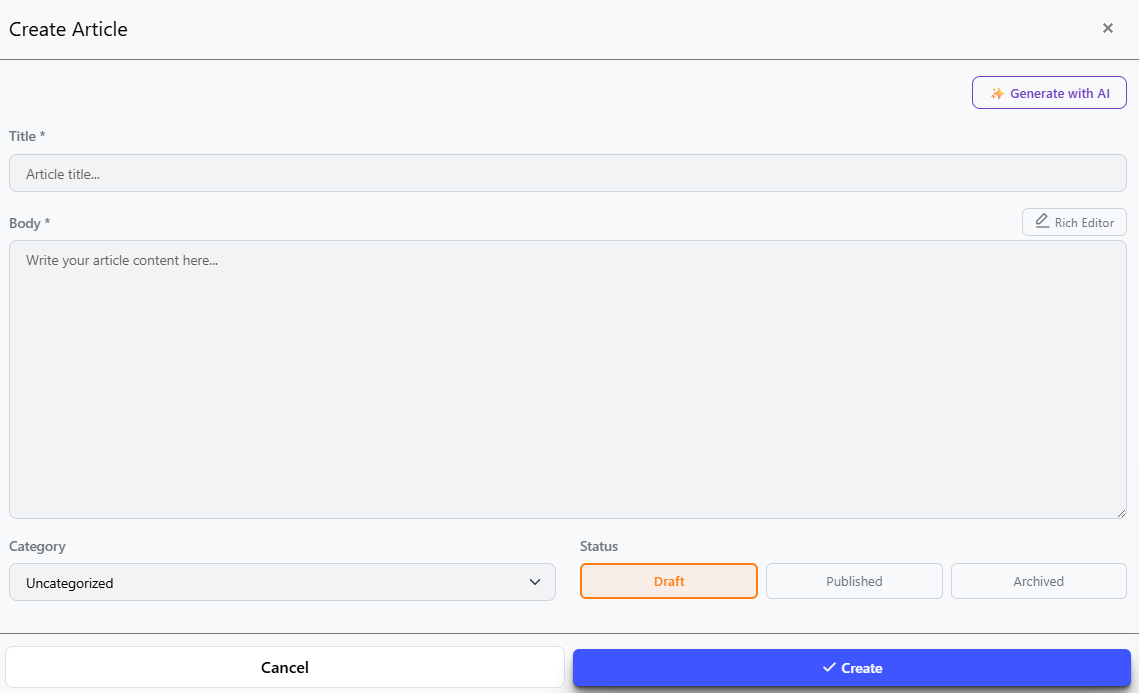
Give your article a Title and write the content in the Body field — you can format the text using the rich editor toolbar. Pick a Category to file it under, and choose a Status: Draft keeps it hidden while you work on it, Published makes it visible, and Archived removes it from view without deleting it. When you're ready, hit Create to save it.

Not sure what to write? Click Generate with AI and describe what the article should cover — the AI will write a draft for you that you can edit before saving.
AI Assistant 
The AI assistant can help you build out your knowledge base faster. It can look at what topics your tickets commonly cover and suggest articles that would be useful to have — so you're not starting from scratch wondering what to write.
Once you pick a suggestion, the AI will generate a full article draft for you — just review it, make any edits, and publish when it's ready.